In an era where video quality directly impacts engagement, creators are increasingly turning to AI-powered tools to restore, upscale, and enhance footage. Media.io positions itself not just as an AI video enhancer, but as a platform that understands large models deeply and connects video enhancement with a complete audio-visual creation workflow.
This review takes a close look at Media.io’s AI Video Enhancer, its real-world performance, how it compares with existing competitors, and why it stands out for creators who want to improve video quality for free before committing to advanced plans.
Ultimate AI Video Enhancement Tools Comparison
The AI video enhancement space has grown rapidly, with several tools focusing on specific restoration tasks. The table below compares Media.io with four real, widely-used competitors.
| Tool | Key Strengths | Platform | Pricing Model | Best For |
| Media.io Video Enhancer | Instant online AI enhancement, smart denoise & sharpening, face optimization, fastest workflow | Web | Free tier + flexible plans | Everyday creators who want pro results in seconds |
| Topaz Video AI | Studio-grade super resolution, motion interpolation, deep customization | Desktop | One-time license | Film & archival professionals |
| AVCLabs Video Enhancer AI | Balanced AI restoration, detail recovery, batch processing | Desktop | Subscription/lifetime | Quality-focused desktop users |
| HitPaw AI Video Enhancer | One-click models for face/anime/general video | Desktop | Trial + subscription | Beginners & social content |
| VideoProc AI | Enhancement + conversion + stabilization combo | Desktop | Lifetime/subscription | All-in-one processing |
While most competitors focus on a single enhancement task, Media.io combines AI video upscaling video online free testing, restoration, and post-enhancement creation in one environment.
Why Media.io Stands Out
What makes Media.io different is not just output resolution, but how the platform understands content. Instead of forcing one universal filter onto every clip, Media.io applies specialized large models across video, audio, image, and avatar domains. This shared multimodal intelligence allows it to improve video quality without introducing artificial textures or over-sharpened artifacts.
- Speed over complexity – No installation, no graphics card marathon, just upload and enhance. Perfect for tight deadlines and non-technical teams.
- 4K is the practical sweet spot – For YouTube, TikTok, online courses, and marketing videos, 4K delivery covers 99% of real use cases without massive render times.
- Smarter workflow – Built-in noise reduction, face refinement, and format optimization in a single web pipeline.
- Cross-device freedom – Works the same on an office PC, MacBook, or even a café laptop with modest specs.
What Is Media.io AI Video Enhancer
Media.io AI Video Enhancer is an online video quality enhancer designed to automatically restore clarity, upscale resolution, and correct visual defects using AI. It supports common formats like MP4 and MOV, processes clips up to 4K, and works directly in the browser without installation.
The tool is particularly effective for creators dealing with YouTube uploads, social videos, AI-generated clips, old recordings, or low-light footage that needs professional polish.
Key Features of Media.io AI Video Enhancer
Multi-Model Video Enhancement for Different Problems
Media.io treats “video enhancer” as a system rather than a single switch. Each enhancement mode is powered by a dedicated AI model:
- Video Enhancer improves overall clarity, sharpness, and color balance for general footage, making it suitable for most everyday videos.
- Video Denoise removes grain, compression artifacts, and noise, especially effective for low-light or heavily compressed clips.
- Portrait Enhancer refines facial details such as skin texture, eyes, and edges while avoiding unnatural smoothing, which is crucial for interviews, vlogs, and short-form content.
- Anime Enhancer restores line clarity, colors, and motion consistency in animated or stylized footage, making it ideal for anime edits and AIGC content.
- Smart Color Correction automatically fixes faded tones and exposure issues
- Video Upscale to 4K supports 1x, 2x, and 4x proportional enlargement without distorting motion.
Powered by Large Multimodal Models
Media.io is built as a platform that understands large models across video, audio, image, and avatar generation. This shared architecture improves how the AI interprets motion continuity, edges, facial structure, and color transitions. As a result, upscaling video to 4K looks natural rather than algorithmic.
A Complete Creative Workspace After Upscaling
Unlike standalone AI video enhancer tools, Media.io does not stop at restoration. Once the enhancement is complete, creators can immediately continue production inside the same platform. Videos can be matched with AI voiceovers, paired with visuals, transformed using styles, or placed into layouts drawn from over 5,000 trending templates. This makes Media.io especially attractive to creators producing short-form and platform-native content.
Trend-Aware Inspiration and Templates
Media.io’s Explore section acts as a living inspiration hub rather than a static template gallery. Trending formats, viral styles, and curated series update continuously, allowing users to recreate popular aesthetics instantly. This is particularly valuable for YouTube video quality enhancer online free users who want enhanced visuals aligned with current trends.
Free Daily Credits
Logged-in users receive free daily credits, making Media.io one of the most accessible ways to test AI upscaling video online for free before upgrading. This lowers the barrier for creators who want to experiment without upfront commitment.
How to Use Media.io AI Video Enhancer
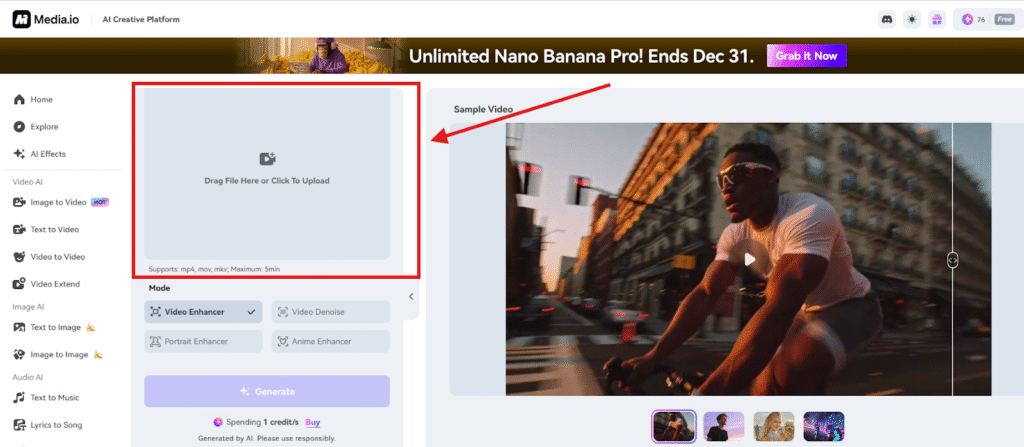
Step 1. Upload Your Video
Open the AI Video Enhancer and drag your file into the workspace. Media.io supports MP4, MOV, MKV, and other common formats, including older low-quality clips.
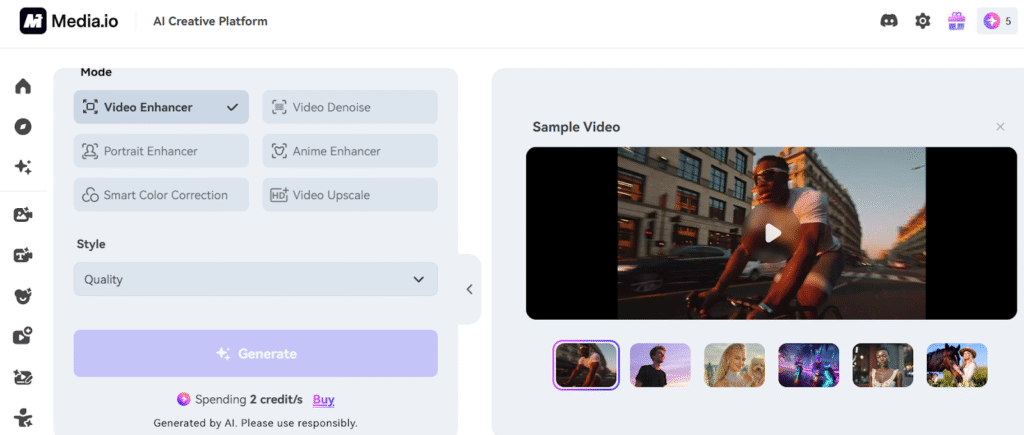
Step 2. Select Enhancement Mode
After loading, choose the enhancement model that matches your footage. Options include Video Enhancer, Video Denoise, Portrait Enhancer, Anime Enhancer, Smart Color Correction, and AI Video Upscale with 1x, 2x, or 4x scaling. Selecting the right model has a significant impact on the final quality.
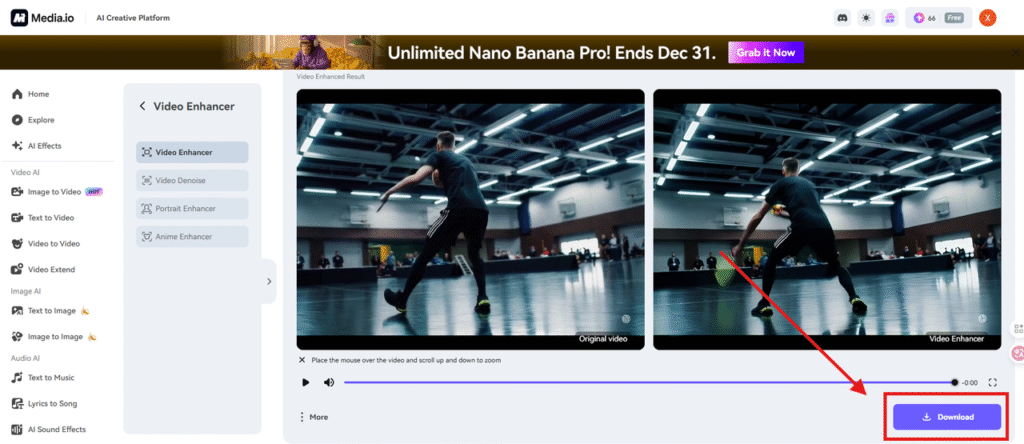
Step 3. Generate and Download the Enhanced Video
Click Generate and let the AI process your clip. Once complete, preview the before-and-after frames and download your enhanced video.
Conclusion
Media.io is more than a video quality enhancer. It represents a new category of AI video enhancement platforms that combine restoration, upscaling, creativity, and trend awareness in one place. For creators looking to improve video quality for free, upscale video to 4K, or build content efficiently using AI, Media.io delivers a flexible and future-ready solution that most single-purpose tools cannot match.